Example I: Tracking data stored in files
In this example notebook we are going to track rain-rates that are estimated from radar based reflectivities. The rain-rates is an example dataset from the CPOL radar archive that used to operate north of Darwin, Australia. This example dataset has been provided by Valentin Louf from the Australian Bureau of Meteorology.
A more detailed example of the application of the tracking algorithm can be found in doi: 10.1002/qj.4360
Before we get started we import all modules that are needed to apply the tracking
[1]:
from IPython.display import HTML
from tintx import RunDirectory, config
import xarray as xr
import pandas as pd
from pathlib import Path
import os
import matplotlib.pyplot as plt
import cartopy.crs as crs
%matplotlib inline
In this example we want to apply the tracking algorithm only for a limited time period. Such time periods can be passed as string or datetime object. If defined as a string make sure they follow the ISO 8061 convention.
[2]:
first = '2006-11-16 03:00' #Start-date
last = '2006-11-16 11:00' #End-date
data_files = Path(os.environ["DATA_FILES"])
To apply the tracking we create an instance of the RunDirectory class. Normally we would have to create this instance with a xarray.DataArray. The from_files method is a convenience method that allows us to create this instance without opening a dataset. The method will open the data files and create an object. We will have to provide a filename or a list of files, the name of the variable and if not according to cf conventions the names of the longitude, latitude and time
dimensions and the used Coordinate Reference System (CRS) of the source data:
[3]:
RD = RunDirectory.from_files( data_files / "CPOL_radar.nc", "radar_estimated_rain_rate",
                             start=first, end=last, use_cftime=True, x_coord="longitude", y_coord="latitude", crs="aeqd")
Additional keyword arguments can be added to the xarray.open_mfdataset method. In this example we used the use_cftime keyword to convert the time variable to cftime vectors.
The tuning parameters
To apply the actual tracking algorithm we can use the get_tracks method. The algorithm can be tuned by passing the values for the tuning parameters. See also the tuning parameter section of the docs.
[4]:
print(config.__doc__)
Tracking tuning parameters
--------------------------

The following parameter can be set to tune the cell tracking algorithm

* field_thresh: units of 'field' attribute, default: 32
    The threshold used for object detection. Detected objects are connected
    pixels above this threshold.
* iso_thresh: units of 'field' attribute, default: 4
    Used in isolated cell classification. Isolated cells must not be connected
    to any other cell by contiguous pixels above this threshold.
* iso_smooth: pixels, default: 4
    Gaussian smoothing parameter in peak detection preprocessing. See
    single_max in tint.objects.
* min_size: square kilometers, default: 8
    The minimum size threshold in pixels for an object to be detected.
* search_margin: meters, default: 250
    The radius of the search box around the predicted object center.
* flow_margin: meters, default: 750
    The margin size around the object extent on which to perform phase
    correlation.
* max_disparity: float, default: 999
    Maximum allowable disparity value. Larger disparity values are sent to a
    large number.
* max_flow_mag: meters per second, default: 50
    Maximum allowable global shift magnitude. See get_global_shift in
    tint.phase_correlation.
* max_shift_disp: meters per second, default: 15
    Maximum magnitude of difference in meters per second for two shifts to be
    considered in agreement. See correct_shift in tint.matching.
* gs_alt: meters, default: 1500
    Altitude in meters at which to perform phase correlation for global shift
    calculation. See correct_shift in tint.matching.


Setting and getting the tuning parameters
-----------------------------------------
The parameters can the set using the :py:class:`tintx.config.set` class.
Getting the values of the currently set parameters can be done by the
:py:func:`tintx.config.get` method.
Apply the tracking with a rain-rate threshold of 0.1 and a minimum size of 4. The return value of the function will be the total number of individual storms identified by the algorithm.
[5]:
num_cells = RD.get_tracks(field_thresh=0.1, min_size=4)
print(f"Number of storm cells found: {num_cells}")
Number of storm cells found: 125
Accessing the track data
The actual tracking data is stored in a multi-index pandas.DataFrame and can be accessed via the tracks property, it will be converted to geopandas.GeoDataFrame on the fly:
[6]:
RD.tracks
[6]:
| time | grid_x | grid_y | lon | lat | area | max | mean | isolated | geometry | ||
|---|---|---|---|---|---|---|---|---|---|---|---|
| scan | uid | ||||||||||
| 0 | 0 | 2006-11-16 03:00:00 | 6.308 | 45.731 | 129.8469 | -12.5164 | 26 | 1.451491 | 0.980084 | False | POLYGON ((-130000.000 -40000.000, -125000.000 ... |
| 1 | 2006-11-16 03:00:00 | 2.034 | 51.655 | 129.7554 | -12.3810 | 29 | 1.398994 | 0.771455 | False | POLYGON ((-140000.000 -27500.000, -135000.000 ... | |
| 2 | 2006-11-16 03:00:00 | 103.341 | 50.902 | 132.0804 | -12.4046 | 41 | 5.279258 | 0.977871 | False | POLYGON ((107500.000 -25000.000, 110000.000 -2... | |
| 3 | 2006-11-16 03:00:00 | 75.000 | 49.750 | 131.4358 | -12.4288 | 4 | 1.249542 | 0.653577 | False | POLYGON ((42500.000 -22500.000, 45000.000 -225... | |
| 4 | 2006-11-16 03:00:00 | 90.684 | 52.842 | 131.8040 | -12.3605 | 19 | 3.560659 | 1.146169 | False | POLYGON ((82500.000 -17500.000, 87500.000 -175... | |
| ... | ... | ... | ... | ... | ... | ... | ... | ... | ... | ... | ... |
| 46 | 121 | 2006-11-16 10:40:00 | 37.000 | 78.630 | 130.5622 | -11.7766 | 27 | 31.208767 | 7.085050 | True | POLYGON ((-62500.000 47500.000, -62500.000 525... |
| 124 | 2006-11-16 10:40:00 | 30.800 | 79.600 | 130.4244 | -11.7539 | 5 | 9.346570 | 2.719892 | True | POLYGON ((-70000.000 52500.000, -70000.000 575... | |
| 47 | 123 | 2006-11-16 10:50:00 | 89.444 | 15.333 | 131.7603 | -13.2150 | 9 | 0.227352 | 0.168942 | False | POLYGON ((77500.000 -110000.000, 82500.000 -11... |
| 121 | 2006-11-16 10:50:00 | 37.400 | 78.640 | 130.5622 | -11.7766 | 25 | 14.703703 | 3.166035 | False | POLYGON ((-60000.000 47500.000, -60000.000 525... | |
| 48 | 121 | 2006-11-16 11:00:00 | 36.905 | 79.095 | 130.5622 | -11.7766 | 21 | 14.791470 | 3.332414 | True | POLYGON ((-62500.000 47500.000, -62500.000 500... |
299 rows × 10 columns
After each tracking the RunDirectory class creates a so called hash of the resulting DataFrame and saves the tuning parameters for this specific tracking. The next time you call the tracking method the previous tuning parameters are noted and set automatically. This means that in the above example the filed_thresh and min_size parameters are automatically set for the next tracking.
Displaying the results
Let’s do some visualisation and create an animation of the tracks. This can be done by calling the animate method.
Note: To convert possible UTC time strings to local time we can give a time shift (dt) in hours. The plot styling can be fine tuned by the plot_style key word
[7]:
anim = RD.animate(dt=9.5, fps=2, vmin=0.01, plot_style=dict(resolution="10m", title="Rain-rate"))
The return value is a matplotlib FuncAnimation Object. The animation can be save or displayed in a notebook:
[8]:
HTML(anim.to_html5_video())
[8]:
It is also possible to save the animation to a file:
anim.save("cpol_tracking.gif", fps=3)
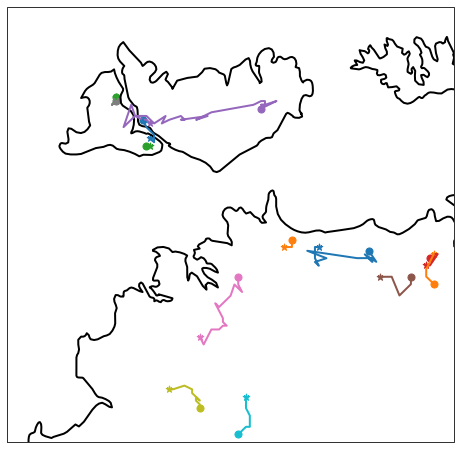
The traces of the tracks can also be plotted using the plot_trajectories method:
[9]:
ax = RD.plot_trajectories(mintrace=4, plot_style=dict(lw=2))
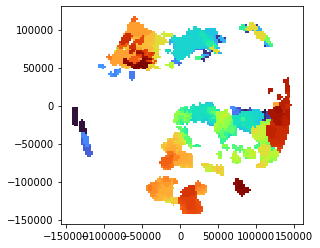
For recent tintX versions the cell polygons are available. We can create a simple overview-plot like this:
[10]:
RD.tracks.plot(aspect=1, cmap="turbo")
[10]:
<AxesSubplot:>
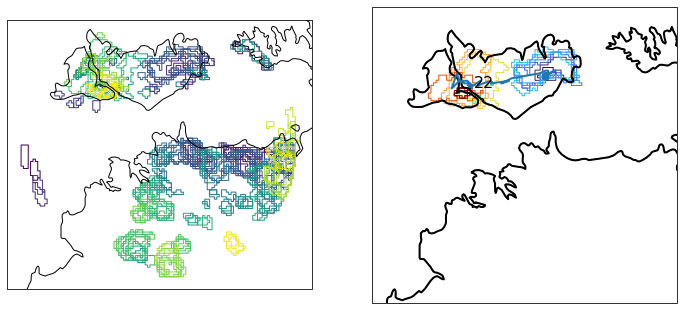
Utilizing cartopy the creation of plots on a map is straightforward:
[11]:
# NBVAL_SKIP
fig = plt.figure(figsize=(12,10))
ax = fig.add_subplot(121, projection=crs.PlateCarree())

gdf = RD.tracks

# plot everything
gdf.plot(ax=ax, cmap="viridis", facecolor="None", transform=gdf.crs, aspect=1)
ax.coastlines(resolution="10m")

# plot single track
ax = fig.add_subplot(122, projection=crs.PlateCarree())
uid = "22"
gdf["geometry"][:, uid].plot(ax=ax,
                              cmap="turbo",
                              facecolor="None",
                              transform=gdf.crs,
                              aspect=1)
RD.plot_trajectories(ax=ax, mintrace=4, plot_style=dict(lw=2), uids=[uid], label=True)
ax.coastlines(resolution="10m")
[11]:
<cartopy.mpl.feature_artist.FeatureArtist at 0x7f40b80af670>
Saving the tracks for later analysis:
For a later analysis the results can be saved using the save_tracks method. This will save the tracks DataFrame to a hdf5 table format. hdf5 is the format of choice as it can save additional meta data like the tracking parameters.
[12]:
RD.save_tracks("/tmp/tint_tracks.h5")
Loading the tracked files
If you have saved the tracked object with the save_tracks method you can create an instance of the RunDirectory object using the from_dataframe method. This method will load the tracks DataFrame and also try to re-open the data files that were used to track the object.
[13]:
RD = RunDirectory.from_dataframe("/tmp/tint_tracks.h5")
RD.data
[13]:
<xarray.Dataset>
Dimensions:                    (time: 49, x: 117, y: 117)
Coordinates:
  * time                       (time) datetime64[ns] 2006-11-16T03:00:00 ... ...
  * x                          (x) int32 -145000 -142500 ... 142500 145000
  * y                          (y) int32 -145000 -142500 ... 142500 145000
Data variables:
    radar_estimated_rain_rate  (time, x, y) float64 dask.array<chunksize=(49, 117, 117), meta=np.ndarray>
    latitude                   (x, y) float64 dask.array<chunksize=(117, 117), meta=np.ndarray>
    longitude                  (x, y) float64 dask.array<chunksize=(117, 117), meta=np.ndarray>
    isfile                     (time) int32 dask.array<chunksize=(49,), meta=np.ndarray>
Attributes: (12/25)
    Conventions:         CF/Radial instrument_parameters
    version:             2017-10
    title:               CPOL product level 2
    institution:         Australia Bureau of Meteorology
    references:          If you use this dataset, please cite: 'An integrated...
    source:              UF raw files
    ...                  ...
    state:               NT
    history:             October 2017 recalibration: May 2017 recalibration
    volume_number:       0
    platform_type:       fixed
    instrument_type:     radar
primary_axis: axis_z[14]:
RD.tracks
[14]:
| time | grid_x | grid_y | lon | lat | area | max | mean | isolated | geometry | ||
|---|---|---|---|---|---|---|---|---|---|---|---|
| scan | uid | ||||||||||
| 0 | 0 | 2006-11-16 03:00:00 | 6.308 | 45.731 | 129.8469 | -12.5164 | 26 | 1.451491 | 0.980084 | False | POLYGON ((-130000.000 -40000.000, -125000.000 ... |
| 1 | 2006-11-16 03:00:00 | 2.034 | 51.655 | 129.7554 | -12.3810 | 29 | 1.398994 | 0.771455 | False | POLYGON ((-140000.000 -27500.000, -135000.000 ... | |
| 2 | 2006-11-16 03:00:00 | 103.341 | 50.902 | 132.0804 | -12.4046 | 41 | 5.279258 | 0.977871 | False | POLYGON ((107500.000 -25000.000, 110000.000 -2... | |
| 3 | 2006-11-16 03:00:00 | 75.000 | 49.750 | 131.4358 | -12.4288 | 4 | 1.249542 | 0.653577 | False | POLYGON ((42500.000 -22500.000, 45000.000 -225... | |
| 4 | 2006-11-16 03:00:00 | 90.684 | 52.842 | 131.8040 | -12.3605 | 19 | 3.560659 | 1.146169 | False | POLYGON ((82500.000 -17500.000, 87500.000 -175... | |
| ... | ... | ... | ... | ... | ... | ... | ... | ... | ... | ... | ... |
| 46 | 121 | 2006-11-16 10:40:00 | 37.000 | 78.630 | 130.5622 | -11.7766 | 27 | 31.208767 | 7.085050 | True | POLYGON ((-62500.000 47500.000, -62500.000 525... |
| 124 | 2006-11-16 10:40:00 | 30.800 | 79.600 | 130.4244 | -11.7539 | 5 | 9.346570 | 2.719892 | True | POLYGON ((-70000.000 52500.000, -70000.000 575... | |
| 47 | 123 | 2006-11-16 10:50:00 | 89.444 | 15.333 | 131.7603 | -13.2150 | 9 | 0.227352 | 0.168942 | False | POLYGON ((77500.000 -110000.000, 82500.000 -11... |
| 121 | 2006-11-16 10:50:00 | 37.400 | 78.640 | 130.5622 | -11.7766 | 25 | 14.703703 | 3.166035 | False | POLYGON ((-60000.000 47500.000, -60000.000 525... | |
| 48 | 121 | 2006-11-16 11:00:00 | 36.905 | 79.095 | 130.5622 | -11.7766 | 21 | 14.791470 | 3.332414 | True | POLYGON ((-62500.000 47500.000, -62500.000 500... |
299 rows × 10 columns
Obtaining tuning parameters from tracked objects
Sometimes it might be useful to retrieve the tuning parameters that resulted in certain object tracks. This is especially important when using the from_dataframe method. As previously mentioned the RunDirectory class keeps track of all tuning parameters that resulted in object tracks. To retrieve such tuning parameters you can use the get_parameters method. By default the method will look for latest track objects.
[15]:
RD.get_parameters()
[15]:
{'ISO_THRESH': 4.0,
 'FIELD_THRESH': 0.1,
 'ISO_SMOOTH': 4.0,
 'MIN_SIZE': 4.0,
 'SEARCH_MARGIN': 250.0,
 'FLOW_MARGIN': 750.0,
 'MAX_DISPARITY': 999.0,
 'MAX_FLOW_MAG': 50.0,
 'MAX_SHIFT_DISP': 15.0,
 'GS_ALT': 1500.0}
This concludes the first tutorial, in the next one we will explore the application of the tracking algorithm to data has already been loaded.