Example II: Tracking already loaded data
Sometimes data needs to be processed first. For example if derived variables like density potential temperature are applied to the tracking, or data needs to be remapped first. In this scenario you would create the dataset yourself, rather then letting the code load the data, and apply the tracking on the dataset. In this example we are going to process satellite based rainfall estimates from the CMORPH product over the Indonesian archipelago.
Before we get started we import all modules that are needed to apply the tracking:
[1]:
from IPython.display import HTML
from tintx import RunDirectory, config
import xarray as xr
import pandas as pd
from pathlib import Path
import os
%matplotlib inline
[3]:
os.environ["DATA_FILES"] = "_static/data"
Cmorph is globally available from 60°S - 60°N. In this example we are going to open the dataset and select the sub-region that suits the Indonesian archipelago.
[4]:
data_files = Path(os.environ["DATA_FILES"])
files = [str(f) for f in data_files.rglob('CMORPH*.nc')]

dset = xr.open_mfdataset(sorted(files), combine='by_coords').sel(
    lon=slice(100, 160), lat=slice(-13, 13))
dset
names0: [['time', 'time_bounds', 'lat', 'lat_bounds', 'lon', 'lon_bounds', 'cmorph'], ['time', 'time_bounds', 'lat', 'lat_bounds', 'lon', 'lon_bounds', 'cmorph'], ['time', 'time_bounds', 'lat', 'lat_bounds', 'lon', 'lon_bounds', 'cmorph'], ['time', 'time_bounds', 'lat', 'lat_bounds', 'lon', 'lon_bounds', 'cmorph'], ['time', 'time_bounds', 'lat', 'lat_bounds', 'lon', 'lon_bounds', 'cmorph'], ['time', 'time_bounds', 'lat', 'lat_bounds', 'lon', 'lon_bounds', 'cmorph'], ['time', 'time_bounds', 'lat', 'lat_bounds', 'lon', 'lon_bounds', 'cmorph'], ['time', 'time_bounds', 'lat', 'lat_bounds', 'lon', 'lon_bounds', 'cmorph'], ['time', 'time_bounds', 'lat', 'lat_bounds', 'lon', 'lon_bounds', 'cmorph'], ['time', 'time_bounds', 'lat', 'lat_bounds', 'lon', 'lon_bounds', 'cmorph'], ['time', 'time_bounds', 'lat', 'lat_bounds', 'lon', 'lon_bounds', 'cmorph'], ['time', 'time_bounds', 'lat', 'lat_bounds', 'lon', 'lon_bounds', 'cmorph'], ['time', 'time_bounds', 'lat', 'lat_bounds', 'lon', 'lon_bounds', 'cmorph'], ['time', 'time_bounds', 'lat', 'lat_bounds', 'lon', 'lon_bounds', 'cmorph'], ['time', 'time_bounds', 'lat', 'lat_bounds', 'lon', 'lon_bounds', 'cmorph'], ['time', 'time_bounds', 'lat', 'lat_bounds', 'lon', 'lon_bounds', 'cmorph'], ['time', 'time_bounds', 'lat', 'lat_bounds', 'lon', 'lon_bounds', 'cmorph'], ['time', 'time_bounds', 'lat', 'lat_bounds', 'lon', 'lon_bounds', 'cmorph'], ['time', 'time_bounds', 'lat', 'lat_bounds', 'lon', 'lon_bounds', 'cmorph'], ['time', 'time_bounds', 'lat', 'lat_bounds', 'lon', 'lon_bounds', 'cmorph'], ['time', 'time_bounds', 'lat', 'lat_bounds', 'lon', 'lon_bounds', 'cmorph'], ['time', 'time_bounds', 'lat', 'lat_bounds', 'lon', 'lon_bounds', 'cmorph'], ['time', 'time_bounds', 'lat', 'lat_bounds', 'lon', 'lon_bounds', 'cmorph'], ['time', 'time_bounds', 'lat', 'lat_bounds', 'lon', 'lon_bounds', 'cmorph']]
CO: {'time_bounds', 'lat_bounds', 'cmorph', 'lon_bounds', 'time'}
KEYS: ['time', 'time_bounds', 'lat', 'lat_bounds', 'lon', 'lon_bounds', 'cmorph']
names: {'lon_bounds', 'lon', 'time', 'time_bounds', 'lat_bounds', 'cmorph', 'lat'}
[4]:
<xarray.Dataset>
Dimensions:      (time: 48, lon: 825, nv: 2, lat: 357)
Coordinates:
  * lon          (lon) float64 100.0 100.1 100.1 100.2 ... 159.8 159.9 160.0
  * time         (time) datetime64[ns] 2020-01-25 ... 2020-01-25T23:30:00
  * lat          (lat) float64 -12.95 -12.88 -12.81 -12.73 ... 12.81 12.88 12.95
Dimensions without coordinates: nv
Data variables:
    lon_bounds   (time, lon, nv) float64 dask.array<chunksize=(2, 825, 2), meta=np.ndarray>
    time_bounds  (time, nv) datetime64[ns] dask.array<chunksize=(2, 2), meta=np.ndarray>
    lat_bounds   (time, lat, nv) float64 dask.array<chunksize=(2, 357, 2), meta=np.ndarray>
    cmorph       (time, lat, lon) float32 dask.array<chunksize=(2, 357, 825), meta=np.ndarray>
Attributes: (12/57)
    ncei_template_version:      NCEI_NetCDF_Grid_template_V2.0
    title:                      NOAA Climate Data Record (CDR) of CPC Morphin...
    keywords:                   Precipitation, Satellite, High-Resolution, Gl...
    summary:                    The CMORPH CDR is a reprocessed and bias-corr...
    references:                 Xie, P., et al. (2017), Reprocessed, Bias-Cor...
    Conventions:                CF-1.6, ACDD-1.3
    ...                         ...
    geospatial_lat_resolution:  0.072771376
    geospatial_lat_units:       degrees_north
    geospatial_lon_min:         0.0
    geospatial_lon_max:         360.0
    geospatial_lon_resolution:  0.072756669
geospatial_lon_units: degrees_east[5]:
dset = dset.rename({"cmorph": "precip"})
We can now simply create a RunDirectory object by directly initialising the class. Since the time, lon and lat dimensions already have the default names we don’t have to pass the x_coord, y_coord or time_coord keywords:
[6]:
RD = RunDirectory(dset, "precip")
RD.data
[6]:
<xarray.Dataset>
Dimensions:      (time: 48, lon: 825, nv: 2, lat: 357)
Coordinates:
  * lon          (lon) float64 100.0 100.1 100.1 100.2 ... 159.8 159.9 160.0
  * time         (time) datetime64[ns] 2020-01-25 ... 2020-01-25T23:30:00
  * lat          (lat) float64 -12.95 -12.88 -12.81 -12.73 ... 12.81 12.88 12.95
Dimensions without coordinates: nv
Data variables:
    lon_bounds   (time, lon, nv) float64 dask.array<chunksize=(2, 825, 2), meta=np.ndarray>
    time_bounds  (time, nv) datetime64[ns] dask.array<chunksize=(2, 2), meta=np.ndarray>
    lat_bounds   (time, lat, nv) float64 dask.array<chunksize=(2, 357, 2), meta=np.ndarray>
    precip       (time, lat, lon) float32 dask.array<chunksize=(2, 357, 825), meta=np.ndarray>
Attributes: (12/57)
    ncei_template_version:      NCEI_NetCDF_Grid_template_V2.0
    title:                      NOAA Climate Data Record (CDR) of CPC Morphin...
    keywords:                   Precipitation, Satellite, High-Resolution, Gl...
    summary:                    The CMORPH CDR is a reprocessed and bias-corr...
    references:                 Xie, P., et al. (2017), Reprocessed, Bias-Cor...
    Conventions:                CF-1.6, ACDD-1.3
    ...                         ...
    geospatial_lat_resolution:  0.072771376
    geospatial_lat_units:       degrees_north
    geospatial_lon_min:         0.0
    geospatial_lon_max:         360.0
    geospatial_lon_resolution:  0.072756669
geospatial_lon_units: degrees_eastThe tuning parameters
To apply the actual tracking algorithm we can use the get_tracks method. The algorithm can be tuned by passing the values for the tuning parameters. See also the tuning parameter section of the docs:
[7]:
print(config.__doc__)
Tracking tuning parameters
--------------------------

The following parameter can be set to tune the cell tracking algorithm

* field_thresh: units of 'field' attribute, default: 32
    The threshold used for object detection. Detected objects are connected
    pixels above this threshold.
* iso_thresh: units of 'field' attribute, default: 4
    Used in isolated cell classification. Isolated cells must not be connected
    to any other cell by contiguous pixels above this threshold.
* iso_smooth: pixels, default: 4
    Gaussian smoothing parameter in peak detection preprocessing. See
    single_max in tint.objects.
* min_size: square kilometers, default: 8
    The minimum size threshold in pixels for an object to be detected.
* search_margin: meters, default: 250
    The radius of the search box around the predicted object center.
* flow_margin: meters, default: 750
    The margin size around the object extent on which to perform phase
    correlation.
* max_disparity: float, default: 999
    Maximum allowable disparity value. Larger disparity values are sent to a
    large number.
* max_flow_mag: meters per second, default: 50
    Maximum allowable global shift magnitude. See get_global_shift in
    tint.phase_correlation.
* max_shift_disp: meters per second, default: 15
    Maximum magnitude of difference in meters per second for two shifts to be
    considered in agreement. See correct_shift in tint.matching.
* gs_alt: meters, default: 1500
    Altitude in meters at which to perform phase correlation for global shift
    calculation. See correct_shift in tint.matching.


Setting and getting the tuning parameters
-----------------------------------------
The parameters can the set using the :py:class:`tintx.config.set` class.
Getting the values of the currently set parameters can be done by the
:py:func:`tintx.config.get` method.
Once the object has been created the cells can be tracked and plotted like in Example I (with a little more tuning):
[8]:
num_cells = RD.get_tracks(min_size=8,
                          field_thresh=3,
                          iso_thresh=10,
                          iso_smoth=10,
                          search_margin=8750,
                          flow_margin=1750,
                          max_disparity=999,
                          max_flow_mag=5000,
                          max_shift_disp=1000,
                         )
print(f"Number of storm cells found: {num_cells}")
Number of storm cells found: 344
Accessing the track data
Like in the previous example I the actual tracking data is stored in a multi-index pandas.DataFrame and can be accessed via the tracks property:
[7]:
RD.tracks
[7]:
| time | grid_x | grid_y | lon | lat | area | max | mean | isolated | ||
|---|---|---|---|---|---|---|---|---|---|---|
| scan | uid | |||||||||
| 0 | 0 | 2020-01-25 00:00:00 | 623.304 | 2.087 | 145.3314 | -12.8078 | 23 | 5.07 | 4.811738 | True |
| 1 | 2020-01-25 00:00:00 | 819.826 | 13.765 | 159.6645 | -11.9345 | 115 | 6.40 | 4.352870 | True | |
| 2 | 2020-01-25 00:00:00 | 620.889 | 22.111 | 145.1859 | -11.3523 | 9 | 3.41 | 3.383333 | True | |
| 3 | 2020-01-25 00:00:00 | 617.827 | 29.442 | 144.9677 | -10.8429 | 52 | 5.61 | 4.107116 | True | |
| 4 | 2020-01-25 00:00:00 | 594.500 | 48.400 | 143.2215 | -9.4603 | 10 | 3.68 | 3.420000 | True | |
| ... | ... | ... | ... | ... | ... | ... | ... | ... | ... | ... |
| 47 | 322 | 2020-01-25 23:30:00 | 463.125 | 257.875 | 133.6904 | 5.8217 | 8 | 5.97 | 5.950000 | True |
| 323 | 2020-01-25 23:30:00 | 363.900 | 271.100 | 126.4875 | 6.7677 | 10 | 14.00 | 6.623000 | True | |
| 272 | 2020-01-25 23:30:00 | 364.314 | 279.451 | 126.4875 | 7.3499 | 51 | 91.00 | 21.292744 | True | |
| 324 | 2020-01-25 23:30:00 | 375.667 | 292.216 | 127.3605 | 8.2959 | 51 | 9.54 | 4.426471 | True | |
| 325 | 2020-01-25 23:30:00 | 363.475 | 294.220 | 126.4147 | 8.4415 | 59 | 16.90 | 6.375593 | True |
2732 rows × 9 columns
After each tracking the RunDirectory class creates a so called hash of the resulting DataFrame and saves the tuning parameters for this specific tracking. The next time you call the tracking method the previous tuning parameters are noted and set automatically. This means that in the above example the filed_thresh and min_size parameters are automatically set for the next tracking.
Displaying the results
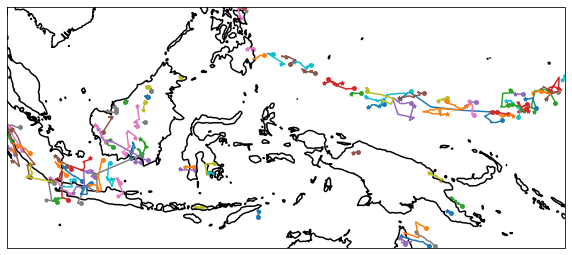
Data visualisation works just like in the previous example. For example we can plot the storm trajectories:
[8]:
ax = RD.plot_trajectories(plot_style={"resolution": "10m", "ms": 15, "lw": 1.5},
                          label=False,
                          mintrace=10,
)
Saving the tracks for later analysis
Again, for a later analysis the results can be saved using the save_tracks method. This will save the tracks DataFrame to a hdf5 table format. hdf5 is the format of choice as it can save additional metadata to like the tracking parameters.
[9]:
RD.save_tracks("/tmp/tint_tracks_sat.h5")
Loading the tracked files
Loading the files is somewhat more tricky since we haven’t used the from_files class method to load the data set and the RunDirectory class has no information about the data files that were opened to create the dataset.
Still we can load a tracked dataset from a hdf5 tracking file by providing the dataset the tracking is based on. In our case this is the cmorph dataset we opened:
[10]:
RD = RunDirectory.from_dataframe("/tmp/tint_tracks_sat.h5", dataset=dset)
RD.data
[10]:
<xarray.Dataset>
Dimensions:      (time: 48, nv: 2, lat: 357, lon: 825)
Coordinates:
  * time         (time) datetime64[ns] 2020-01-25 ... 2020-01-25T23:30:00
  * lat          (lat) float64 -12.95 -12.88 -12.81 -12.73 ... 12.81 12.88 12.95
  * lon          (lon) float64 100.0 100.1 100.1 100.2 ... 159.8 159.9 160.0
Dimensions without coordinates: nv
Data variables:
    time_bounds  (time, nv) datetime64[ns] dask.array<chunksize=(2, 2), meta=np.ndarray>
    lat_bounds   (time, lat, nv) float64 dask.array<chunksize=(2, 357, 2), meta=np.ndarray>
    lon_bounds   (time, lon, nv) float64 dask.array<chunksize=(2, 825, 2), meta=np.ndarray>
    precip       (time, lat, lon) float32 dask.array<chunksize=(2, 357, 825), meta=np.ndarray>
Attributes: (12/57)
    ncei_template_version:      NCEI_NetCDF_Grid_template_V2.0
    title:                      NOAA Climate Data Record (CDR) of CPC Morphin...
    keywords:                   Precipitation, Satellite, High-Resolution, Gl...
    summary:                    The CMORPH CDR is a reprocessed and bias-corr...
    references:                 Xie, P., et al. (2017), Reprocessed, Bias-Cor...
    Conventions:                CF-1.6, ACDD-1.3
    ...                         ...
    geospatial_lat_resolution:  0.072771376
    geospatial_lat_units:       degrees_north
    geospatial_lon_min:         0.0
    geospatial_lon_max:         360.0
    geospatial_lon_resolution:  0.072756669
geospatial_lon_units: degrees_east[11]:
RD.tracks
[11]:
| time | grid_x | grid_y | lon | lat | area | max | mean | isolated | ||
|---|---|---|---|---|---|---|---|---|---|---|
| scan | uid | |||||||||
| 0 | 0 | 2020-01-25 00:00:00 | 623.304 | 2.087 | 145.3314 | -12.8078 | 23 | 5.07 | 4.811738 | True |
| 1 | 2020-01-25 00:00:00 | 819.826 | 13.765 | 159.6645 | -11.9345 | 115 | 6.40 | 4.352870 | True | |
| 2 | 2020-01-25 00:00:00 | 620.889 | 22.111 | 145.1859 | -11.3523 | 9 | 3.41 | 3.383333 | True | |
| 3 | 2020-01-25 00:00:00 | 617.827 | 29.442 | 144.9677 | -10.8429 | 52 | 5.61 | 4.107116 | True | |
| 4 | 2020-01-25 00:00:00 | 594.500 | 48.400 | 143.2215 | -9.4603 | 10 | 3.68 | 3.420000 | True | |
| ... | ... | ... | ... | ... | ... | ... | ... | ... | ... | ... |
| 47 | 322 | 2020-01-25 23:30:00 | 463.125 | 257.875 | 133.6904 | 5.8217 | 8 | 5.97 | 5.950000 | True |
| 323 | 2020-01-25 23:30:00 | 363.900 | 271.100 | 126.4875 | 6.7677 | 10 | 14.00 | 6.623000 | True | |
| 272 | 2020-01-25 23:30:00 | 364.314 | 279.451 | 126.4875 | 7.3499 | 51 | 91.00 | 21.292744 | True | |
| 324 | 2020-01-25 23:30:00 | 375.667 | 292.216 | 127.3605 | 8.2959 | 51 | 9.54 | 4.426471 | True | |
| 325 | 2020-01-25 23:30:00 | 363.475 | 294.220 | 126.4147 | 8.4415 | 59 | 16.90 | 6.375593 | True |
2732 rows × 9 columns
After loading the track data we can inquire the tuning parameters that had been applied to create the tracks:
[12]:
RD.get_parameters()
[12]:
{'ISO_THRESH': 10.0,
 'FIELD_THRESH': 3.0,
 'ISO_SMOOTH': 4.0,
 'MIN_SIZE': 8.0,
 'SEARCH_MARGIN': 8750.0,
 'FLOW_MARGIN': 1750.0,
 'MAX_DISPARITY': 999.0,
 'MAX_FLOW_MAG': 5000.0,
 'MAX_SHIFT_DISP': 1000.0,
 'GS_ALT': 1500.0,
 'ISO_SMOTH': 10.0}
This concludes the second tutorial, in the next one we will explore the application of the tracking algorithm via the Command Line Interface.